Managing Specimen Data:
This is one of several chapters of or “Standardized Routine Workflow for Collecting & Processing Lichens ‒ from Specimen to Species“.
In this Workflow Tutorial we provide general recommendations on best practices for data management for specimens of lichenized, lichenicolous and allied fungi:
collecting → curating → managing specimen data → imaging specimens → routine microscopy → thin-layer chromatography → DNA-extraction & barcoding
_______________________________________________________________________________________
Table of Contents
- General Considerations
- Introduction: Field Names, Formatting & Data Entry
- Collector Information
- Identification & Determination History
- Locality
- Coordinates & Elevation
- Miscellaneous
- Habitat (macrohabitat)
- Substrate (incl. microhabitat)
- Associated Taxa
- Description
- Notes
- Fields not generally used dealing with lichens
- Curation
- Saving & Cloning
_______________________________________________________________________________________
General Considerations
Databases vs. Spreadsheets
Managing specimen records in a professional database has many advantages. To this day, large historic collections are typically still not fully databased. Many smaller collections and private researchers with only limited resources often use simple spreadsheets or custom-made databases to keep track of their collections.
This is not a good idea…
Spreadsheets typically do not follow any established standards, how collection data should be organized, which information should be recorded when collecting specimens, and how that information should be stored. Spreadsheets are designed to execute mathematical calculations, sorting rows and columns can inadvertently mix up records and corrupt the data.
A simple spreadsheet cannot keep track of relational data. For example, it is not possible to store a history of how specimen identifications have changed over time. It is not possible to link several different images, genetic or molecular records to the same specimen either. In a flat file, with rows and columns these kind of relationships cannot be established.
However, software to build relational database has disadvantages too. Custom-built relational databases often do not adhere to biodiversity data standards and thus records from these databases often cannot easily be exchanged.
When managing your data in a spreadsheet or a custom-built database, it is strongly recommended that you consider using standardized field names. Here an example spreadsheet:
This spreadsheet example contains the minium fields regularly used.
If you manage your data following this format, it can easily be uploaded to the Consortium. Even if fields in your own database or spreadsheet are named differently; as long as the content follows the recommendations outlined in this spreadsheet, the data can easily be mapped for uploading to the Consortium.
Sharing Information: advancing biodiversity knowledge through collaboration
The main purpose of databaseing specimen records is not just to keep track of a collection, but to share information, making specimen records accessibly to a broader community of researchers and collaborators.
This is particularly important for type specimens, i.e., the physical “gathering of specimens” that are required to be deposited in a collection when new species are being described. The reason, why the Code of Nomenclature requires that scientific names must based on types , is simple:
A species name represents a hypothesis (i.e., that this name refers to a particular species distinct from all others, but also more closely related to some). To be scientifically sound, it must be possible to test these hypotheses by reviewing the material a name is based upon. Types must therefore be accessible for research.
But other specimens are also valuable only, if they are accessible, if they can be studied, examined, compared. Researchers thus benefit from unhindered access to collections – both the ones who originally collected the material (and their institutions), as well as other who get the opportunity to study the material.
No specimen determination, no identification, no name is final. The idea that data must not be shared, that specimen records must only be made available, when the material has “accurately been identified”, is absurd. How can it be justified to collect living organisms during a biodiversity crisis, with many species threatened, if we not at least use these collections to share and advance knowledge?
Historic Legacy vs. Opportunities for Knowledge Transfer
As the legacy of colonialism, many historic collections throughout Latin America, Africa, and Asia are today hosted mostly in European and often also North American collections. Researchers from these parts of the world are as a result often reluctant to share records or more recent collections widely. This, ironically, is today one of many impediments to advancing global biodiversity knowledge. Fortunately, most countries today have agree to share their data through the Global Biodiversity Information Facility (GBIF).
The Consortium of Lichen Herbaria: Biodiversity Data Standards
At a very minimum, to facilitate data sharing, Biodiversity Data Standards proposed by the Taxonomic Database Working Group (TDWG) should be followed, when managing specimen records – even if only in spreadsheets.
The Consortium of Lichen Herbaria offers an option to share specimen records directly with the global community of researchers working on lichenized, lichenicolous, and allied fungi.
Records can be managed live, directly online, without the need to install software, purchase or invest resources to build a customized database. The Consortium database is fully compliant with the DarwinCore, which means that records can easily be configured to automatically be shared with GBIF; records in GBIF can thus also be updated, when they are modified in the Consortium.
Tools built into the Consortium include a regularly updated Taxonomic Thesaurus (handling accepted names vs. synonyms), a Taxonomic Name Cleaner that facilitates fixing erroneous taxon names, the option to keep track of name changes when specimens are reviewed and annotated by a researcher, tools to link GenBank sequence data and images of specimens, options to track and manage loans, print labels and annotation slips, batch harvest ecological traits from specimen data, and much more.
Managing data live in the Consortium has the benefit of records always being up-to-date. However, it is possible also to share snapshots, i.e., data sets being managed locally and regularly being updates. Having invested in their local, in-house data software, large collections often prefer this option, when sharing their data through the Consortium.
Whether managing data locally in a spreadsheet (not recommended), in a standalone local database (sharing it as a snapshot), or managing records live online in the Consortium, closely adhering to Biodiversity Data Standards is necessary for sharing the data:
_______________________________________________________________________________________
Symbiota & the DarwinCore
Symbiota, the open-source software platform used by the Consortium of Lichen Herbaria is DarwinCore compliant, which means that, with very few exceptions, it adheres to Biodiversity Data Standards proposed by the Taxonomic Database Working Group (TDWG).
Symbiota supports some fields (such as ‘substrate’) that are not currently supported by the DarwinCore. Some field names used by the Symbiota databases are for convenience occasionally named differently from the terminology employed by the DarwinCore. Thus, the DarwinCore term ‘recordedBy’ is typically the ‘collector’ or ‘observer’ of a record.
During database backups, or when exporting or importing records, or when uploading collections to the Global Biodiversity Information Facility (GBIF), the data set format uses the terminology employed by the DarwinCore and any additional fields are merged (for example: ‘substrate’ is added to ‘habitat’) to assure complete full compatibility for exchanging biodiversity data sets.
_______________________________________________________________________________________
Field Names, Formatting & Data Entry Recommendations with Examples
The Occurrence Editor in Symbiota provide a short dictionary with explanations of the field names and links to the DarwinCore terms:
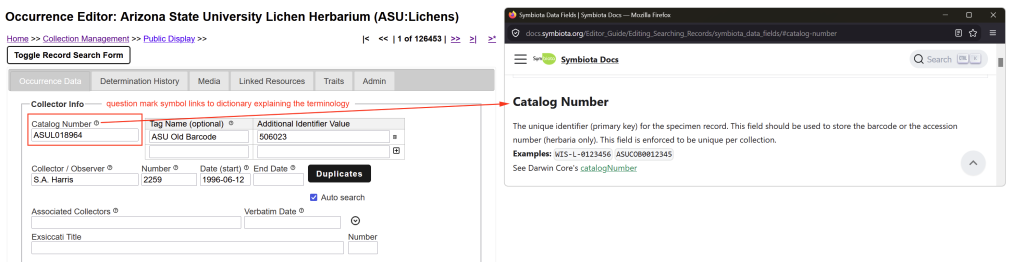
Below, we provide recommendations and examples when dealing with data management of records for lichens, lichenicolous and allied fungi:
_______________________________________________________________________________________
Collector Information
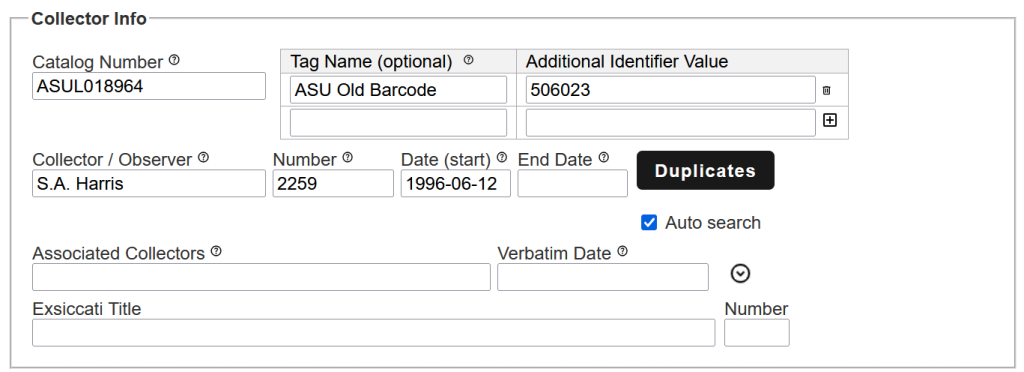
Catalog Number [dwc:catalogNumber]
Catalog Numbers are unique identifiers for a specimen record; to avoid data entry mistakes it is recommended to use barcodes with a hand-held barcode scanner during data entry. Catalog Numbers are typically assigned when a specimen is accessioned into a collection. Thus they are often also called Accession Numbers.
Recommendation: Choosing a barcode format it is best to include the collection acronym, but avoid special characters or symbols, for example ASUL019347 rather than ASUL-019347.
Barcode scanners read barcodes according to the local language settings of a PC. Internationally different keyboards use different layouts. Thus, on an US American keyboard the hyphen “-” is located where on a German keyboard the letter ß is placed. If used with a German keyboard ASUL-019347 will thus be transcribed as ASULß019347.
Resources: LichenLabler is a small program that you can download to print your Catalog Numbers as barcodes directly onto a packet.
Specimen barcode stickers: Code 128 allows for very small barcodes; at ASU we use six digit codes with the prefix ASUL, each sticker 0.875 × 0.412 inch (= 22 × 10 mm) on rolls of 1,000.
_______________________________________________________________________________________
Additional Identifier Values & Tag Names [Symbiota Field: Catalog Numbers documentation page]
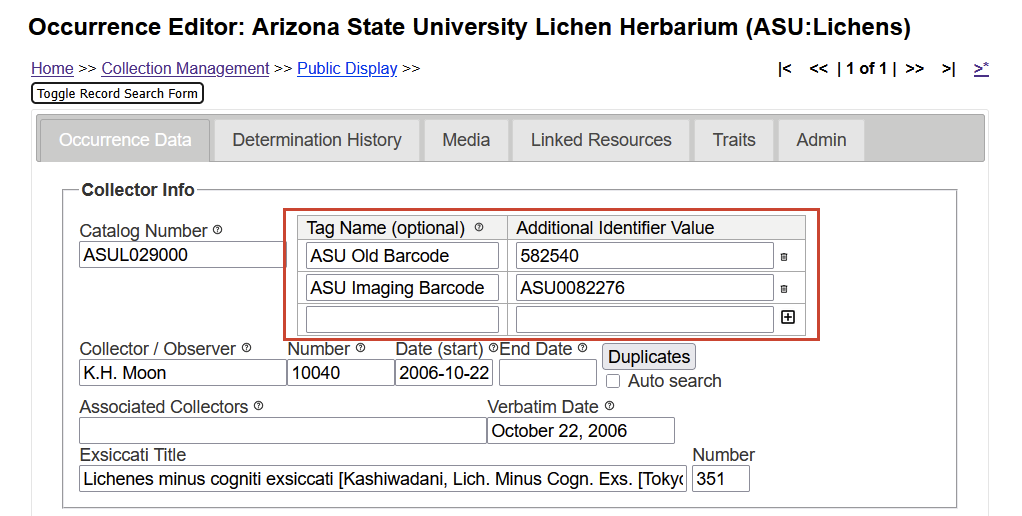
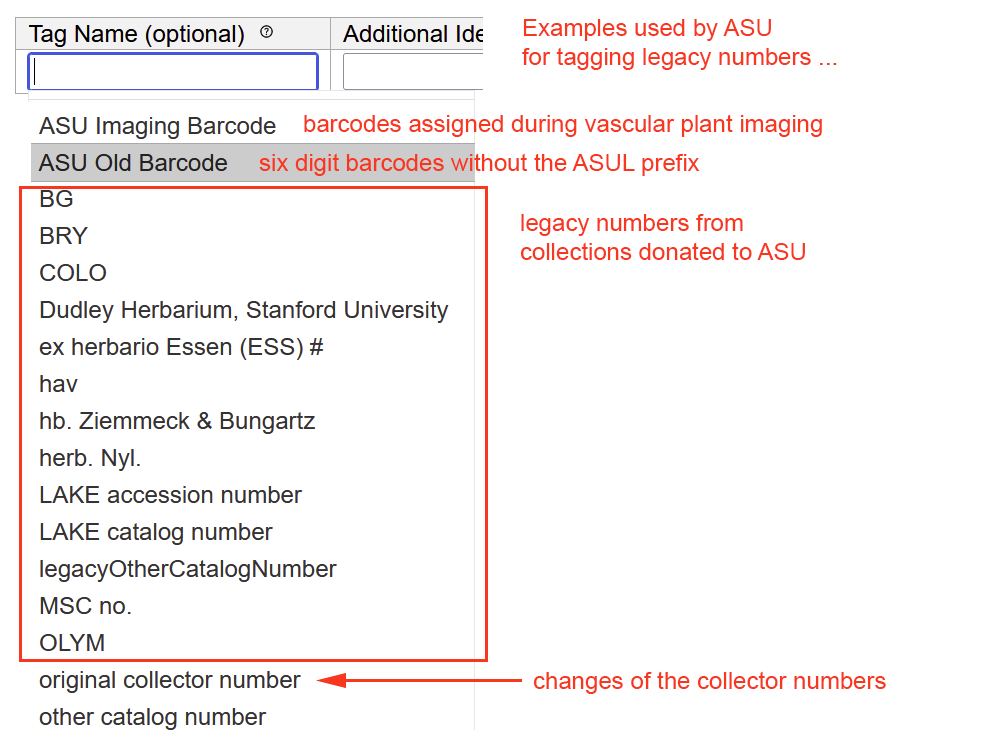
Additional Identifiers are useful to preserve any legacy numbers that at some point in the history of a specimen served as its identifier.
Some Examples:
(1) A specimen has been donated as a gift from a different collection. If that specimen was originally assigned a Catalog Number from the donor institution, this original catalog number should be stored as an additional identifier.
(2) Collectors decide re-assign different numbers, switching for example from one numbering format to a different one. In this case the original number should be preserved as additional identifier.
(3) Catalog Numbers may also change and the legacy numbers (or Other Catalog Numbers) should then be stored as additional identifiers (e.g., ASU migrated from a six digit number barcodes to ones that include ASUL as a prefix).
(4) Original Catalog Numbers need to change when two collections merge and one collection is being integrated into another one. UCR donated all its liken collections to SBBG; the additional identifiers can be used to preserve the UCR catalog numbers while assigning new SBBG numbers. It has been announced that all collections at DUKE will be integrated into UNC. The legacy catalog numbers from DUKE must be preserved as additional identifiers.
(5) Often specimens are collected as part of a specific project, an inventory or ecological study. If researchers assign identifiers as part of this project, these numbers should be preserved when the specimen is eventually accessioned into the collection and then assigned a unique Catalog Number.
(6) The United States National Park Service maintains a database of specimens that reside under permanent loan agreements in different collections. To match catalog numbers from the Park Service database to a Catalog Number assigned by the collection where the specimen is stored, additional identifiers should be used.
Additional Identifiers are a combination of the original numbers (or “values”) that were at some point used to identify a specimen with the “tags” that explain what these values mean:
_______________________________________________________________________________________
Collector / Observer [dwc:recordedBy]
The name of the person who collected a specimen or recorded an observation.
Recommendation: In most cases, lichens cannot reliably be identified in the field, but it is necessary to study anatomical, chemical, or even molecular characters – especially in regions that have poorly been studied. Therefore, it is generally not recommended to only record an observation. Increasingly, researchers can be identified by their Open Researcher and Contributor ID (ORCID number), which may be appended.
Examples: C.G. Pringle Goodding, L.N. John Wesley Powell M. Andrew Johnston (ORCID 0000-0002-0166-6985)
Collector / Observer Number [dwc:recordNumber]
Not to be confused with Field Number or Location ID or an Exsiccati Number.
For the purpose of naming species, when selecting nomenclatural types, the International Code of Nomenclature for Algae, Fungi and Plants distinguishes between “gatherings” and “specimens”. Several specimens that were all collected at the exact same location, on the same day, by the same researcher belong to a single gathering.
When describing a new species, the Code of Nomenclature requires that specimens selected as types must belong to the same gathering, i.e., found during a single collecting event and assigned the same collecting number. It is generally assumed that holotypes (= the original specimen, typically deposited at the researchers home institution) and isotypes (= duplicates distributed elsewhere) bear the same number.
Another name commonly used for this number is collection number, or perhaps more accurately called collector number, because the number is typically assigned by the collector of the specimen.
DarwinCore calls it the recordNumber to emphasize that a number may be assigned when a species was only observed, perhaps documented by a photo, but no physical specimen was collected.
Recommendation: A variety of formats is often used by researchers. Best practice is to assign collector numbers not in the field, but in the lab during specimen processing. For simplicity it is best to use sequence numbers. It is recommended to assign the same number to a specimen and append it by letters, if different species on the same substrate cannot physically be separated (e.g., different species on the same rock, lichenicolous fungi on a host lichen). Duplicates of specimens collected as part of the same gathering, to be distributed to other collections, should not be assigned different numbers.
Associated Collectors [n/a – concatenated into dwc:recordedBy]
This field is not defined by the DarwinCore, but it is strongly recommended to distinguish the main collector from any other researchers who joined the same collecting event. When designating type specimens, only the combination of ‘collector+collector number’ uniquely identifies a specimen from the same gathering; therefore several collectors must not share the same ‘collecting number’.
______________________________________________________________________________________
Collection Dates
Date (start) [dwc:eventDate]
The date when a specimen was collected (= the date of the collecting event).
Recommendation: To avoid confusion dates should be stored according to the ISO-8601 numeric format (YYYY-MM-DD). Unknown month or days may be entered as “00”. For example, a collection with a date of “March 1956” can be entered as “1956-03-00”. However, see also Verbatim Date.
Examples: 1983-09-15 | 1983-07-00 | 1934-00-00
End Date [dwc:eventDate]
For some organisms it may not be possible to record an exact date when a specimen was collected (for example insects caught during several days in a pit-fall trap).
Recommendation: For lichens recording the start and end date of a collecting trip is not recommended; instead the exact day when a specimen was collected should be documented; this is implied by entering only a start, but no end date.
Verbatim Date [dwc:verbatimEventDate]
When the exact day of a collecting event has not been recorded or is unknown this text field allows for documentation of the date given on a label. The Verbatim Date field is especially useful for data entry of historic specimens, where an exact date is often not available.
_______________________________________________________________________________________
Exsiccatae
Exsiccata Title [n/a]
Exsiccata are a set of dried specimens, numerous duplicates of the same species, all collected at the same locality and identified by the same researcher(s), then distributed to many different herbaria. When these specimens are distributed, a printed list, the so-called ‘schedae’, is published and sent along.
The purpose of these special collections is to distribute, disseminate and thus document a particular species concept. Exsiccata may be types, if they are designated as such. However, most exsiccata simply document the taxonomic opinion of a particular researcher, what constitutes a particular species.
Recommendation: Due to their unique importance, exsiccata should, like types, be stored separately from the main collection. The Consortium includes an Index of Exsiccatae, from which titles must be selected when entering specimens. These titles can also be found at IndExs.
Exsiccata Number [n/a]
The Exsiccata Number is the number under which an exsiccatum, i.e., one particular specimen in the set of species called exsiccata, was published. This number is listed on the label typically in front of the species name under which the exsiccatum was distributed; it is also the sequence number in the list that was published as schedae, when the exsiccata was distributed.
NOTE: The correct name for a set of dried plant specimens is ‘exsiccata‘, in the case of fungi ‘exciccati‘. A single specimen, not the entire set, is called ‘exsiccatum‘.
_______________________________________________________________________________________
Identification & Determination History
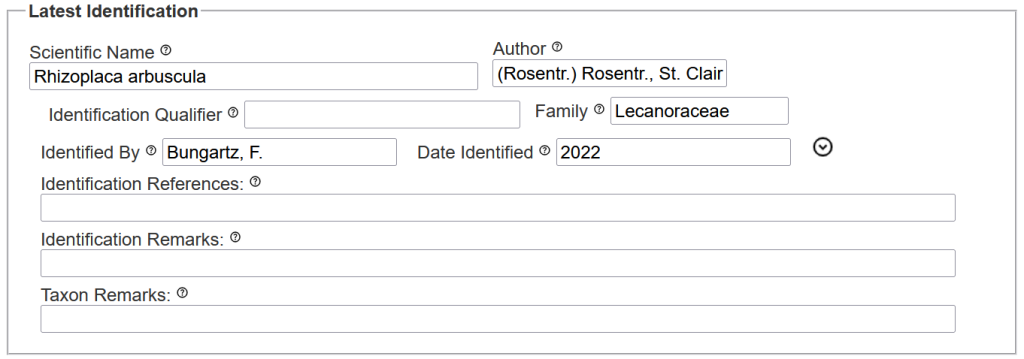
Before specimens are accessioned into a collection they are typically identified. Typically the first identification is not yet the final one. For example, it may only be possible to assign the material to a particular family or genus, but not yet a species. Names also change for taxonomic reasons (e.g., when a species is transferred into a different genus). Often expert also disagree on the correct identification.
Professional specimen management systems like the Consortium keep a determination history of how species identifications change. They also typically include a Taxonomic Thesaurus that links synonyms to their currently accepted names.
Since January 1, 2013 it is mandatory that scientific names of fungi must be registered in one of the three available international taxonomic names repositories: Index Fungorum (Kew, United Kingdom), Mycobank (Utrecht, The Netherlands), or Fungal Names (Beijing, China). These fungal names repositories use numerical identifiers that are globally unique and synchronized across the three databases [for example Buellia spuria (Schaer.) Anzi is identified by Index Fungorum Registration Identifier 380715 = MycoBank #380715 = Fungal Names Registration Identifier 380715].
It is not yet universally implemented, but strongly recommended that specimen databases use these identifiers to uniquely identify taxon names.
Scientific Name [dwc:scientificName]
The International Code of Nomenclature for Algae, Fungi and Plants distinguishes the scientific name as the name for a particular taxonomic group at a specific rank (= a taxon). The name of a species is a binominal, i.e., a combination of the genus name and a specific epithet, e.g., Buellia spuria. For a subspecies, variety, or form this binominal is appended, e.g., Buellia spuria var. insularis.
Strictly speaking, the name of the researcher who publishes a scientific name is not part of that scientific name.
The reason for nevertheless including the author with the scientific name is to avoid confusion. To be considered valid, species names must be based on type specimens. Occasionally an author publishes a name without being aware that the same name has previously already been published by a different author on a different type. Both names are homonyms, i.e., the same scientific names, but with different authors, based on different types. Both homonyms may have been validly published (i.e., conforming to the rules of nomenclature), but only the one published first is legitimate.
To be able to distinguish homonyms, it is therefore strongly recommended that scientific names are always listed with their authors, e.g., Buellia spuria (Schaer.) Anzi. The DarwinCore recommends using “…the full scientific name, with authorship…” when databasing records.
Warning: Currently most Symbiota portals distinguish only the ‘sciname’ as the ‘scientific name without its author’, ignoring the full ‘scientific name’ of a taxon. For the Consortium of Lichen Herbaria we are in the process adding unique identifiers [Mycobank Number = Index Fungorum Registration Identifiers = Fungal Names Registration Identifier] as Symbiota ‘sourceIdentifiers’ to the database. Formatting of these sourceIdentifiers follows Recommendations by John Brinda from Bryonames.
Recommendation: In the database ‘sciname’ and author should be entered into separate fields, but treated as a single unit to be able to distinguish homonyms.
Examples: Caliciaceae | Usnea | Buellia spuria | Acantholichen sorediatus | Pertusaria tejocotensis var. stictica
Author [dwc:scientificNameAuthorship]
The name of the person(s) who first described a particular taxon. The different Codes of Nomenclature follow different conventions. For species names of Algae, Fungi and Plants, in addition to the name of the author(s) who first described the species, also the authors who later changed the taxonomic position of a name are listed.
For example:
Buellia spuria was initially described 1828 by the German lichenologist Schaerer as Lecidea spuria. In 1860 the Italian lichenologist Anzi then transferred the species into the genus Buellia, publishing it as a new combination: Buellia spuria. By convention the two names are cited as Lecidea spuria Schaer. and Buellia spuria (Schaer.) Anzi, the first author of a combination in parentheses.
Note: According to the International Code of Nomenclature for Algae, Fungi and Plants the correct term is the author of a taxon, not the “authority”.
A taxonomic authority is any expert working on a particular taxonomic group, a specialist who published extensively on that group. For example, María de los Ángeles Herrera-Campos is a Mexican lichenologist, considered a specialist in genus Usnea, especially for Latin America. Damien Ertz is a Belgian lichenologist, who specializes on Arthoniales. Bibiana Moncada has published significant treatments of the genus Sticta. They must all be considered taxonomic authorities, yet, although they described numerous species in the group that they worked on, they are obviously not the authors of all the taxa that they study.
Recommendation: Author names are frequently listed with a taxon in an abbreviated form. To avoid confusion it is important that these abbreviations follow the standard used by Index Fungorum. Alternatively, following Mycobank, the full name of authors may be cited.
Examples: A.W. Archer, Bungartz & Yánez-Ayabaca | Lücking | L. | (Schaer.) Anzi |(Stirt.) Zahlbr.
Identification Qualifier [dwc:identificationQualifier]
This important field is too often ignored and its purpose typically misunderstood, when databasing specimen identifications. To express how certain they are about a species identification, researchers often add identification qualifiers to their determination.
Commonly used qualifier are (the abbreviations should be entered into the Indentification QUalifier field):
cf. = confer = compare with… [used when the identification is uncertain; when using in combination with a species name the cf. may be positioned either in front of the genus or in front of the specific epithet, e.g., cf. Buellia spuria would be interpreted that this might be Buellia spuria, but even the genus might not be correctly identified; Buellia cf. spuria would instead suggest that at least the genus has been correctly identified, but it is not certain whether this is the correct species identification; this distinction is somewhat academic, but it is lost with the DarwinCore recognizing only a single Identification Qualifier field]
s.l. = sensu lato = in the widest sense [used when the name is considered to be poorly resolved and the concept of that name only loosely applies; distinct but often not clearly distinguished from aff. or agg.]
s.str. = sensu stricto = in the strict sense [the name as it is most narrowly defined; the most accurate interpretation of that name]
aff. = affinis = allied / related to … [related, but not strictly belonging to this taxonomic group; distinct but often not clearly distinguished from s.l. or agg.]
agg. = aggregatus = a group [denoting an ill defined, large group that likely needs to be seperated into several dsitinct taxa; distinct but often not clearly distinguished from aff. or s.l.]
Recommendation: Identification qualifiers are not part of the names and must therefore be entered into a separate field, otherwise identifications will not be linkt to the names in the taxonomic thesaurus.
Examples: c.f. | s.l. | s.str. | aff. |agg.
_______________________________________________________________________________________
Family [dwc:family]
The Occurrence Editor built into Symbiota includes Family field that autofills when an identification is entered into the Scientific Name field.
This field is, however, redundant. All taxon names are part of the taxonomic thesaurus and linked to their parent taxon through the thesaurus. Uploading data sets from a spreadsheet or external database, the scientific names in the data set are matched against this thesaurus.
Additionally it may sometimes only be possible to identify the larger group that a specimen belongs to, for example the family. In that case the name of the family would have to be entered into Scientific Name, and the family field will consequently be left empty.
In lichenized, lichenicolous and allied fungi taxonomy is still much in flux and to which family species belongs keeps changing. It is best to simply follow the taxonomy as established by the taxonomic thesaurus.
_______________________________________________________________________________________
Identified By [dwc:identifiedBy]
The name of the person who identified the specimen. Also called a determiner.
Examples: T.H. Nash III | Xinhui Yu | Bungartz, F.
Date Identified [dwc:dateIdentified]
The date the identification was made. Date can be entered as free form text and do not need to be in a standard date format.
Examples: 1992 | May 1992 | 2 May 1992
_______________________________________________________________________________________
Identification References [dwc:identificationReferences]
The reference source used to make the identification.
Examples: Smith et al. (2009) The Lichens of Great Britain and Ireland. British Lichen Society, London | Nash et al. (2002) Lichen Flora of the Greater Sonoran Desert Region. Arizona State University, Tempe
Identification Remarks [dwc:identificationRemarks]
This refers to recording descriptive characters relevant for identifying specimens. In Symbiota, for convenience, this information may also be stored in the description field, although it is not to be confused with a detailed description of a particular species or taxon.
(1) A physical description of a specimen at the time of collection: For basidiolichens it is strongly recommended to record “fresh” characteristics already in the field, ideally taking a high-quality photograph. The basidiocarps of species in Lichenomphalia for example shrivel up, often loose some of their vivid color when stored in the herbarium. Until recently species of Cora where often not distinguished, because some important characters (color, fine hairs) where typically not recorded in the field. These “fresh” characters are lost or overlooked in dried specimens.
(2) Also referring to microscopic or microchemical characters that may only be observed in the lab. Thus, many crustose species may only be distinguished by their spores or other anatomical characters. For foliose species the color of the lower side, or whether the lower side has a cortex or not may be relevant, or how the species is attached. For fruticose species like Usnea the color of the central strand may not be seen unless specimens are examined. Many lichens can only be distinguished by their secondary chemistry.
Some cryptic species may even be distinguished only when molecular sequence data is available (better not recorded here, but added via Linked Resources).
Examples: spores brown, one septate 15 x 5 µm | TLC 2026-09-15, plate 5 (solvent C): cryptostictic, constictic, stictic acid
Taxon Remarks [dwc:taxonRemarks]
Taxonomic remarks about the name used when identifying a specimen. When working with poorly known taxonomic groups, it frequently happens that, although a specimen can be identified as a particular taxon, there nevertheless remain challenges of that taxon name not yet fully resolved.
Examples: The name Herpothallon hyposticticum F. Seavey & J. Seavey is illegitimate, but currently no other name is available for the specimens from Florida; not to be confused with Herpothallon hyposticticum Bungartz & Elix from teh Galapagos | The species name is most likely a synonym of xyz, but futher studies are necessary | The name is probably an illegitimate homonym and a replacement name will thus need to be published
_______________________________________________________________________________________
Locality
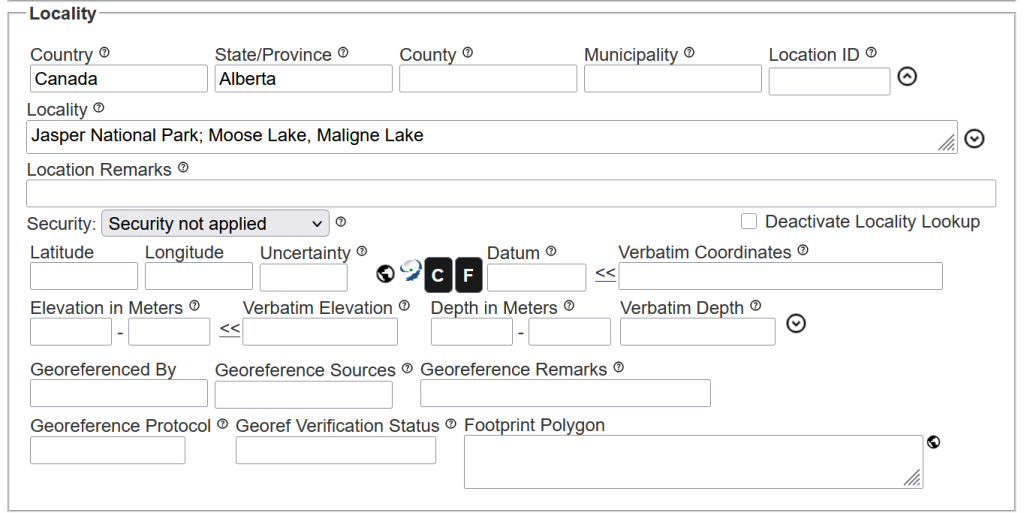
Names for the administrative subdivisions generally vary considerably from country to country and the terms employed by the DarwinCore must not be applied literally.
In the United States, almost all ‘States’ are subdivided into ‘Counties’, but Lousiana calls the same level of administrative subdivision ‘Parishes’, Alaska calls them ‘Boroughs’. Unlike the US, Canada is not subdivided into ‘States’, but ‘Provinces’, respectively ‘Territories’.
In the United Kindom, the dwc:stateProvince field would be used for England, Wales, Scotland, and Northern Ireland. Scotland was traditionally subdivided into counties, but now its administrative subdivisions are called councils.
The Federal Republic of Germany is subdivided into ‘States’, then ‘Kreise’. Historically, eastern Germany distinguished ‘Bezirke’.
Chile distinguishes ‘Regiones’, ‘Provincias’, ‘Comunas’. Colombia is separated into ‘Departamentos’, ‘Municipios’, ‘Veredas’. Ecuador recognizes ‘Provincias’, ‘Cantones’, ‘Paroquias’.
Despite their names, the DarwinCore fields are intended to refer to the administrative hierarchy, with a country in most parts of the world being divided into three administrative subdivisions.
‘dwc:stateProvince’ is the first administrative subdivision, ‘dwc:county’ the second, ‘dwc:municipality’ the third; followed by a description of the specific location and its coordinates, i.e., the distinct site where a specimen was collected.
Country [dwc:country]
The Country is the highest level of a Geographic Designation; it is a political unit and historically often subject to change.
Examples: United States | Brazil | Togo | United Kingdom
State/Province [dwc:stateProvince]
The first level of administrative subdivision recognized within a Country; not to be confused literally with what some countries may call a ‘state’ or ‘province’. Thus, the capital district of Colombia, the state of Arizona in the US, or the province of Galapagos in Ecuador belong here.
Examples: Arizona | Quebec | Sonora | Galápagos | Nordrhein-Westfalen | Wales | Distrito Capital
County [dwc:county]
The administrative subdivision recognized below State/Province; again not to be confused literally with what some countries may call a county. In the United Kingdom the county of Norfolk, in Galapagos the Island of Santa Cruz, in Scotland the Falkirk Council, and in Germany the Kreis Euskirchen belong here.
Examples: Maricopa | Norfolk| Isla Santa Cruz | Falkirk |Euskirchen
Municipality [dwc:municipality]
It is typically not recommended to record this level of administrative subdivision, unless a specimen is in fact collected within the actual limits of a city, town, or village. Most often specimens are, however, not collected within urban areas, that is within a municipality itself, but more often in areas nearby. For example, it would be difficult to collect a saxicolous lichen on a concrete wall of a building in a city without damaging that building. but of course corticolous lichens on a tree in a park of a city may be collected, and then the city may be named as the municipality where that specimen was collected.
Examples: Paradise Valley | Rome | Munich | Guayaquil
Location ID [dwc:locationID]
Also called the Locality Acronym, this field is particularly convenient to uniquely identify a collection site. A field book is useful to keep track of these principal sites, where specimens where collected, the geographic coordinates, and the main vegetation (= macrohabitat) of the site. Using locality acronym already in the field, collection bags can quickly be labeled and in the lab later be sorted by date and locality, before the material is then organized, the collector numbers are assigned and the specimens get curated.
Recommendation: Use simple acronyms of letters and numbers; pay attention that throughout the field book these acronyms are unique for the collection sites visited.
Not to be confused with Field Number, a term not generally used, because it is intended to refer to a collection event (like placing a pit fall trap to collect insects into the ground). However, occasionally a project requires that numbers be already assigned in the field, and in that case a field number may be used, designating a specific event of collecting a specimen.
Examples: AZ1 | COCO15 | ISA3
Locality [dwc:locality]
The specific location, also called the collection site, where a specimen was collected.
Recommendation: Ideally, the description of this site should be sufficiently detailed that the same locality can be found again, even if geographic coordinates were not recorded. The more specific a description of the collection site is, the easier can it be found again and in case that coordinates were not recorded or are erroneous, can later be added or corrected.
Geographic designations, conspicous landmarks, names of highways or roads that are not necessarily part of the administrative subdivisions are usful to be included.
Examples: Bryce Canyon National Park, Jolly Hollow, along a wash ca. 500 southeast ofHwy 12 | US Forest Service Red-Rock Ranger District, N of Sedona, along Long Canyon Trail, N of Rachel's Knoll
Location Remarks [dwc:locationRemarks]
Rarely used for additional comments or notes about the locality.
Examples: Previously known as Mt. Evans Locality no longer accessible
Security [not a DarwinCore field]
Selecting Locality Security applied from the dropdown menue will hide locality details below the level of county from unauthorized users. This is typically done because the species is rare or threatened, or because the collection location is private. Images or other media are also hidden to protect locality details that might be viewable from the label. Users that are logged into the system and have the necessary permission to view locality details (e.g. collection managers) will continue to have access to all data. Locality Security will automatically be applied if the species name is on a portal’s Protected Species list (accessible via Sitemap). Selecting Full Security applied will completely hide the record from all public users who do not have editor or administrator permissions for your collection. Unless legal protections apply, this level of security is generally NOT recommended for most records, as it reduces the discoverability of your collections and obscures valuable data from research and public use. Leaving the Security field at Security not applied will allow default settings to be applied as determined by the sensitive species administrators, which is the recommendation for most records. Refer to the Collection Manager Guide for more information on how data redaction works in Symbiota portals.
This field is not defined by the Darwin Core standard. Hidden records will not be uploaded to GBIF.
_______________________________________________________________________________________
Coordinates & Elevation
Latitude & Longitude [dwc:decimalLatitude & dwc:decimalLongitude]
The geographic latitude and longitude in decimal degrees. Latitudes from the southern hemisphere and longitudes in the western hemisphere (e.g. USA) should be entered as negative values. Click on the “Tools” button to enter the coordinates in the degree, minute, seconds (DMS) or the UTM formats. Decimal degrees are the preferred coordinate standard as defined by Darwin Core.
Examples: 34.874022 -111.75774
Uncertainty [dwc:coordinateUncertaintyInMeters]
Rarely used.
The accuracy of the georeference coordinates in meters (numeric value only). This is measured as the radius of a circle where the true point would be found if known. If coordinates are collected using a GPS, than the accuracy would be the error found within the GPS unit (usually around 10m). While previously collected specimens that have coordinates on the label recorded by the collector typically do not state the source of the coordinates (GPS, map, etc), it is typically a good assumption that the coordinates are accurate within one to two hundred meters. If the locality details are vague such as just “Grand Canyon, then the coordinates should be the centroid within the uncertainty encompassing the greater area where the specimen may have been collected. If the locality is Boynton Canyon, Sedona, the uncertainty would be about 1500 m. This field autofills when using GeoLocate for georeferencing.
Examples: 42000 | 100
Datum [dwc:geodeticDatum]
The most commonly used geodetic datum format is WGS84; when nothing is entered here the system assumes this is the datum being used.
The geographic system that was used when determining the coordinates. This field autofills when using GeoLocate or the Mapping tool for georeferencing.
Examples: NAD27 | NAD83 | WGS84
Verbatim Coordinates [dwc:verbatimCoordinates]
The DarwinCore recommends recording coordinates as decimals, not as degree° | minutes’ | seconds”. Symbiota permits data entry in many different formats and converts the data on the fly, but when entering verbatim coordinates, it is important to follow a consistent format:
If your coordinates are in Degrees-Minutes-Seconds (DMS), Universal Transverse Mercator (UTM), or the Township-Range-Section” (TRS) format, click the “F” button to view the formatting tools. Fill in the appropriate box with the coordinates on your label and select the appropriate “Insert Values” button. Valid values in DMS or UTM formats will automatically convert into decimal degree values. If a value has previously been entered into the Verbatim Coordinates field, you can try to click the double arrows (<<) to the left of this field to try to auto-convert them into decimal degrees format. TRS coordinates cannot be automatically converted in the data entry form, but they may be converted into an appropriate georeference using the GEOLocate tool. For more information about this and about using the coordinate tools, see this tutorial video.
Examples: 34°13.940'N, 112°2.370'W | 12 420944E 4064025N | TRS: T40N R32E S29
_______________________________________________________________________________________
Elevation in Meters [dwc:minimumElevationInMeters & dwc:maximumElevationInMeters]
The elevation in meters above Mea Sea Level at which the specimen was collected. Also occasionally referred to as ‘altitude’. Strictly speaking, however, only ‘elevation’ refers to geographic features such as the elevation of a mountain above the sea, whereas altitude is the hight that an object is located above the ground (for example a plane moving across the landscape).
Enter only the numbers, not the unit ‘m’ for ‘meter’ into this field. Minimum and Maximum Elevation can be recorded if the exact elevation is unknown. When the exact elevation has been recorded, that value should be stored in Minimum Elevation with Maximum Elevation left blank.
Examples: 1400 | 2000
Verbatim Elevation [dwc:verbatimElevation]
The verbatim elevation at which the specimen was collected. This is typically used to record an elevation measurement that was recorded in feet or an uncertainty designation. When the elevation in meters field is left blank, the value will automatically be converted to meters. Select the double arrows (<<) to replace the previously entered meters values.
Examples: 4500ft | 4500 feet | ca. 4500'| ca. 2000m | 4500'| +/-300'
_______________________________________________________________________________________
The following fields are all rarely used:
Depth in Meters [dwc:minimumDepthInMeters & dwc:maximumDepthInMeters]
Recording the depth below water is largely irrelevant when dealing with lichenized, lichenicolous or allied fungi. Even freshwater species that grow permanently submerged in water (like Peltigera hydrothyria) are rarely found several meters below the surface.
The range of depth below the local surface, in meters. Use the left field to indicate the minimum depth in meters and the right field to indicate the maximum depth in meters.
Examples: 100 | 1042
Verbatim Depth [dwc:verbatimDepth]
The original verbatim description of the depth below the local surface at which the specimen was collected. Again, typically not relevant for lichens.
Examples: 100ft | 100 feet | ca 100' | ca. 30m | 100' | +-10'| 7 fathoms
Georeferenced By [dwc:georeferencedBy]
The name (or username) of the person who georeferenced the specimen record. In Symbiota the field autofills when using GeoLocate for georeferencing.
Examples: Amanda Gonzales | emakings | acbarber
Georeference Sources [dwc:georeferenceSources]
The tool or tools used to georeference and any references consulted to georeference the record.
Examples: GeoLocate | Google Earth | USGS 1:24000 | Florence Montana Quad 1967
Georeference Remarks [dwc:georeferenceRemarks]
Notes regarding the georeferencing of the specimen.
Examples: placed point at centroid of the city, error radius to the extend of city boundaries as viewed on GoogleMaps
Georeference Protocol [dwc:georeferenceProtocol]
The source of the standards used to georeference.
Examples: Georeferencing Quick Guide. Zermoglio et al. 2020 | Engelbrecht, I. 2021. https://doi.org/10.3897/biss.5.73572
Georef Verification Status [dwc:georeferenceVerificationStatus]
A status used to indicate whether or not the geoference has been reviewed or verified.
Examples: reviewed | not reviewed | needs verification | verified by collector
Footprint Polygon [n/a]
A polygon of the collection area in GeoJSON format.
Example:
{
  "type": "Feature",
  "geometry": {
    "type": "Point",
    "coordinates": [125.6, 10.1]
  },
  "properties": {
    "name": "Dinagat Islands"
  }
}
_______________________________________________________________________________________
Miscellaneous
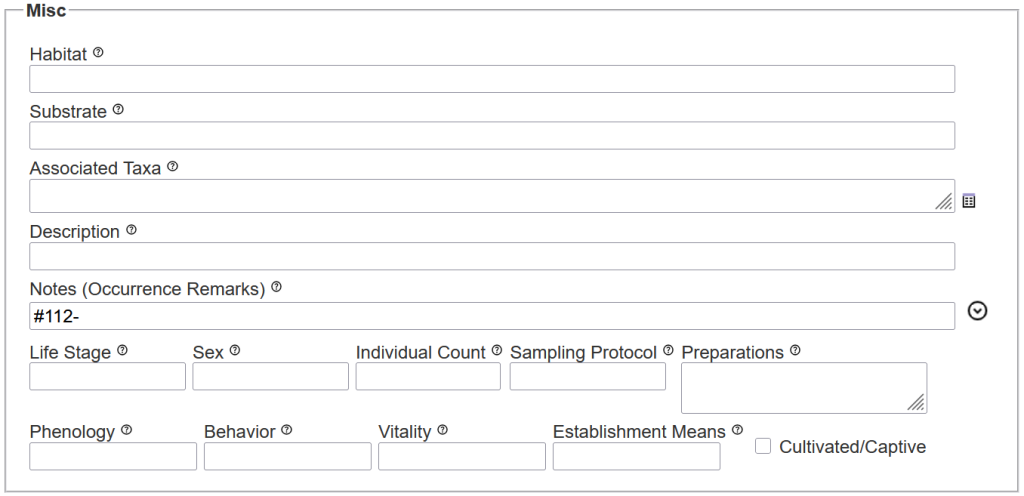
Habitat [dwc:habitat]
The description of the habitat in which the specimen was collected. For lichens, fungi and bryophytes this field should be used for a general description of the macrohabitat, which typically refers to the vegetation where specimens have been collected, but it could also be a large cliff, exposed lava flow, or a rock outcrop devoid of vascular plants.
The macrohabitat of the overall collection site is distinctly different from the microhabitat, which refers to the specific site where a specimen has been collected. this microhabitat typically includes the substrate, but also ecological parameters, whether the site is shaded and sheltered or sunny and exposed, etc. (see the next item: substrate).
Example: Galapagos Humid Zone, dead Cinchona pubescens forest treated with herbicides against invasive species, on S-exposed hill, surrounded by disturbed Scalesia pedunculata forest | along a small stream in chaparral of Live Oak (Quercus turbinella), Pointleaf Manzanita (Arctostaphylos pungens), and Mountain Mahogany (Cercocarpus montanus)| Exposed basalt cliff along the sea shore, largely devoid of vascular plant vegetation, with sparse plants of English Stonecrop (Sedum anglicum) | large lava flow of ropy basalt (pahoehoe) with 'Ohi'a lehua (Metrosideros polymorpha) trees
Substrate [n/a – concatenated into dwc:habitat]
A field particularly relevant for lichens, fungi, and bryophytes. Unfortunately, DarwinCore ignores this important aspect of where these organisms grow and when recordsa are uploaded to GBIF the Symbiota substrate field is lumped into dwc:habitat.
Recommendation: Not only should the actual substrate be recorded here, but also standardized microhabitat information (see best practices for collecting lichens).
Examples: rock, N-exposed front of rhyolite boulder, semi-shaded, wind/rain-exposed | bark, SE-exposed tree trunk of Fraxinus excelsior, ca. 40 cm in diam., shaded, wind/rain-exposed | wood, old, top of rotten tree stump, semi-shaded, wind/rain-exposed | wood, S-exposed side of a hard wood fencepost, sunny, wind/rain-exposed | rock, N-exposed overhand below a cliff, shaded, wind/rain-sheltered
_______________________________________________________________________________________
Associated Taxa [dwc:associatedTaxa]
Redundant, not generally recommended to be used for lichenized, lichenicolous or allied fungi.
The surrounding vascular plant vegetation, for example a forest, is usually considered the macrohabitat and at least the most dominant or characteristic the plants should be recorded as part of that habitat. Recording lichens that have been found in the vicinity of the specimen collected also do not belong here. Without a specimen voucher lichens can typically not reliably be indentified in the field and if specimens were collected, these should be recorded separately.
If specimen records cannot be physically separated (two species on a piece of rock, a lichenicolous fungus on its host lichen) it is best to assign separate records to these specimens in the database, using the same collection number appended with letters (A, B, C…), filing specimens physically in the herbarium using cross-reference cards [see best practices for curation; and how to assign collector numbers]
_______________________________________________________________________________________
Description [n/a – concatenated into dwc:occurrenceRemarks]
This refers to recording descriptive characters relevant for identifying specimens. Not to be confused with a detailed description of a particular species or taxon.
(1) A physical description of a specimen at the time of collection: For basidiolichens it is strongly recommended to record “fresh” characteristics already in the field, ideally taking a high-quality photograph. The basidiocarps of species in Lichenomphalia for example shrivel up, often loose some of their vivid color when stored in the herbarium. Until recently species of Cora where often not distinguished, because some important characters (color, fine hairs) where typically not recorded in the field. These “fresh” characters are lost or overlooked in dried specimens.
(2) Also referring to microscopic or microchemical characters that may only be observed in the lab. Thus, many crustose species may only be distinguished by their spores or other anatomical characters. For foliose species the color of the lower side, or whether the lower side has a cortex or not may be relevant, or how the species is attached. For fruticose species like Usnea the color of the central strand may not be seen unless specimens are examined. Many lichens can only be distinguished by their secondary chemistry.
Some cryptic species may even be distinguished only when molecular sequence data is available (better not recorded here, but added via Linked Resources).
Recommendation: Because this Symbiota field is not supported by the DarwinCore and therefore concatenated with occurrenceRemarks when downloaded as a Darwin Core Archive (DwC-A), it is generally preferred to enter this information as part of the determination of a record as identificationRemarks.
Examples: spores brown, one septate 15 x 5 µm | TLC 2026-09-15, plate 5 (solvent C): cryptostictic, constictic, stictic acid
_______________________________________________________________________________________
Notes [dwc:occurrenceRemarks]
Any additional notes regarding the specimen occurrence at a place in time. Avoid using this field unless a more appropriate data field does not exist.
Examples: common in this region | this specimen collected as part of master's thesis project
_______________________________________________________________________________________
Fields not generally used:
For lichenized, lichenicolous and allied fungi only the samplig protocol and preparations may sometimes be relevant.
Life Stage [dwc:lifeStage]
The age or stage of the organism at the time of collection/observation (typically used for zoological collections). The field is not used for lichenized, lichenicolous or allied fungi.
Examples: larva | juvenile | adult
Sex [dwc:sex]
The biological sex of the occurrence. The field is not used for lichenized, lichenicolous or allied fungi.
Examples: female | male | gynandromorph
Individual Count [dwc:individualCount]
NOT the same as duplicate count! Typically not used for lichenized, lichenicolous or allied fungi.
The number of individuals represented by the occurrence. For fossil collections: include a quantity descriptor.The field is not generally used for lichenized, lichenicolous or allied fungi.
Examples: 2 | 15
Examples (fossils only): 2 item(s) | 200 estimate
Sampling Protocol [dwc:samplingProtocol]
The names and references to methods used to collect or sample an occurrence. The field is generally not used for lichenized, lichenicolous or allied fungi for which the collection methods vary according to the kind of specimens and substrates collected (see best practices for collecting).
Examples: UV light | trap | mist net | Takats et al. 2001. Guidelines for Nocturnal Owl Monitoring in North America. Beaverhill Bird Observatory and Bird Studies Canada, Edmonton, Alberta. 32 pp., http://www.bsc-eoc.org/download/Owl.pdf
Preparations [dwc:preparations]
Preparation or preservation method for a specimen. For lichenized, lichenicolous and allied fungi it is generally recommended to store them as dried herbarium specimens (see best practices for curation); but this field can be useful for sub-samples that are removed from the main specimen vouchers and stored separately. See also storage location and disposition.
Examples: in ethanol | -85°C freezer
Phenology (Reproduction Condition) [dwc:reproductiveCondition]
The reproductive stage of the specimen; for lichenized, lichenicolous or allied fungi typically not routinely recorded. Generally, when examinining these characteristics, they are better recorded as part of the description and/or identification remarks.
Examples: fertile | sterile | with apothecia, perithecia, soredia, isidia, hyphophores, pycnidia ...
Behavior [dwc:behaviour]
The behavior exhibited by the organism/occurrence at the time of collection/observation. The field only applies to animals, not lichenized, lichenicolous or allied fungi.
Examples: flying | sitting on eggs
Vitality [dwc:vitality]
An indication of whether an organism was alive or dead at the time of collection or observation. Typically not recorded when collecting lichenized, lichenicolous or allied fungi, because these organisms in the wild survive long periods dried-out in a state of dormancy.
Examples: live | dead
Establishment Means[dwc:establishmentMeans]
This field may be useful for some collection records, when assessing how a species established at a particular site. It is generally more useful, however, if such assessments are made as part of a checklist (for example the Checklist of Galapagos Endemic Lichens):
Examples: introduced | invasive | native | indigenous | endemic
Cultivated [n/a]
Lichenized, lichenicolous or allied fungi are generally not been cultivated in a lab and cannot generally be grown easily in a greenhouse; therefore this checkbox will typically not apply.
Note: This field is not currently supported by Darwin Core and is therefore not included, when records are exported or uploaded to GBIF.
_______________________________________________________________________________________
Curation
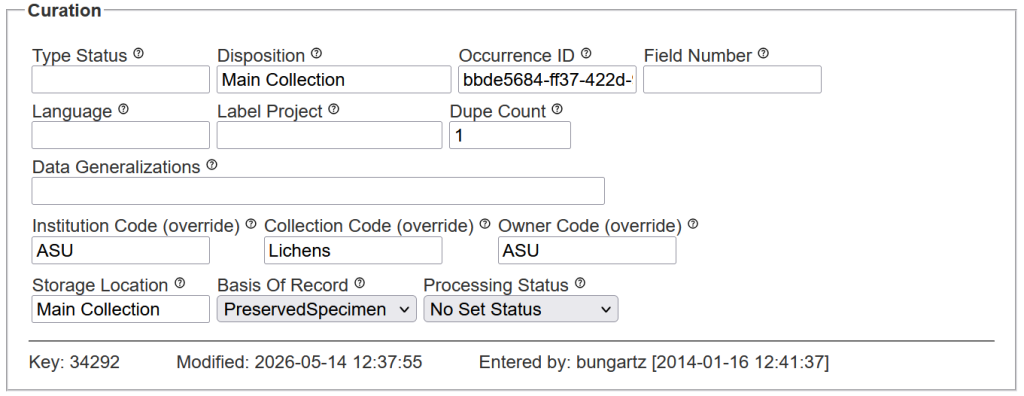
Type Status [dwc:typeStatus]
The type designation of a specimen, whether it is a name-bearing specimen or part of a type series.
Recommendation: It is strongly recommended to include the basionym of the type in this field. For example:
Type specimens are by definition permanently linked to the name of the taxon when it was first described, i.e., the basionym. Identifications of that specimens, however, may change. When a species is placed into a new genus or a variety/subspecies/form is elevated to species, the new combination is still based on the same type.
This is different, however, when type specimens are identified as a different species. For example, Rudolph described Caloplaca arizonica E.D. Rudolph (a name that is illegitimate, because it is a later homonym of Caloplaca arizonica H. Magn.). The holotype of Caloplaca arizonica E.D. Rudolph is hosted at Arizona State University; it is now considered a synonym of Caloplaca pellodella (Nyl.) Hasse, a species first described as Lecanora pellodella Nyl. for which the type is an entirely different specimen in Nylander’s herbarium at Helsinki.
To avoid confusion to which name the type applies it is necessary to be specific:
HOLOTYPE of Caloplaca arizonica E.D. Rudolph (non H. Magn.) nom. illegit.
Note: The International Code of Nomenclature for Algae, Fungi and Plants recognized the following type categories; since they are the most important specimens of a collection, they should be stored separately from the main collection.
Holotype = The one specimen (or illustration) from a single gathering upon which the description of a species, subspecies, or form is based [since January 1, 1990 it is required to select and unequivocally designate a single specimen as the holotype for a name].
The Collection where a Holotype is deposited must be cited in the species description (protologue). It is generally assumed that holotypes are deposited at the home institution where a researcher worked during the time of the description of the species. It is recommended, however that private researchers who are not affiliated with an institution deposit the holotype at institutional collection accessible to other researchers and not in their own personal collection.
Isotype = Any duplicate of the holotype, i.e., all specimens from the same gathering, but deposited typically in collections different from where the holotype is located.
Syntype = A series of type specimen for which it is not known, which particular specimen must be considered the holotype [this for example applies to type specimens of species described before January 1, 1990]
Lectotype = A specimen selected from a series of syntypes to clarify what the name is based on, de facto to be considered the “new holotype”.
Isolectotype = Any duplicate of the lectotype.
Neotype = A specimen selected as the new type, when all original material (holotype and isotypes) has been lost or destroyed. Neotypes should be chosen from material as close as possible to the original type, ideally collected at the same locality (topotype) or at least mentioned already in the original description (paratype).
Isoneotype = Any duplicate of the neotype.
Epitype = An additional specimen designated to clarify an otherwise ambiguous holotype, for example when it is not possible to extract DNA from the original specimens (holotype or isotypes).
Specimens generally also referred to as type, but not part of the original gathering (and therefore typically not stored separately from the main collection):
Paratype = Any specimen cited as the same taxon when the new name was describe; specimens cited with the original description, but not necessarily from the same collection site, not necessarily collected by the same collector, and not necessarily from the same collecting event.
Topotype = Any specimen collected at the type locality, i.e., at the same site where the holotype (and its isotypes) were collected; although from the same site, topotypes are typically not collected by the same collctor and not during the same collecting event (date) as the original material.
Examples (always include the scientific name of the basionym here): holotype of | SCIENTIFIC NAME isotype of SCIENTIFIC NAME | lectotype of SCIENTIFIC NAME
_______________________________________________________________________________________
Disposition [dwc:disposition]
The location or status of a specimen sample separated from the main collection.
Examples: subsample in -85°C freezer, separated from the voucher in the main collection | collection of permanent microscope slides
Storage Location [n/a]
Refers to the permanent physical storage location of the cataloged material within the collection space.
Note: This field is not currently supported by Darwin Core and is therefore not included, when records are exported or uploaded to GBIF.
Examples: Main Collection | Exsiccati Collection | Type Cabinet
_______________________________________________________________________________________
Occurrence ID (override) [dwc:occurrenceID]
The Globally Unique Identifier (GUID) for the specimen. This value should be stable and uniquely identify the specimen relative to all other specimens within the world. If your collection is set to have occurrenceIDs/GUIDs generated by the portal (this is the suggested setting for all live-managed collections), the occurrenceID field will be grey and not editable. To view the full occurrenceID value associated with your specimen, you can click the Public Display link at the top of the page.
Examples: 000866d2-c177-4648-a200-ead4007051b9 | urn:catalog:UWBM:Bird:89776
_______________________________________________________________________________________
Other less relevant fields:
For lichenized, lichenicolous and allied fungi only the Number of Duplicates and a field to mark records for Printing Labels are typically relevant.
Field Number [dwc:fieldNumber]
An identifier given to the collecting event in the field. This is not the same as Location ID, but it refers specifically to the method of collecting a specimen, for example the number designating a pit fall trap that was put into the field for several days to collect insects.
Typically not used when dealing with lichenized, lichenicolous or allied fungi. Rarely, however, it may be necessary to label specific collections already in the field during the collection event, for example when specific specimens need to be labeled as part of a photographic monitoring project or possibly when specimens are being transplanted. In that case, specimen records may not even be collected, but individual specimens distingushed by the field numbers assigned to them; several field numbers might then apply to the same overall location with the same location ID.
_______________________________________________________________________________________
Language [dwc:language]
The language of the label information or record.
Examples: en | es | pt | fr
_______________________________________________________________________________________
Label Project [n/a]
A value used to group records from a specific project or category for internal use. Once a value is entered in this field, all records with that same value can be printed at one time using the batch label printing tools.
Note: This field is not currently supported by Darwin Core and is therefore not included, when records are exported or uploaded to GBIF.
Examples: Sedona Lichen Inventory March 2012 |Frank’s New Labels | Labels of Verrucariaceae from Oregon
_______________________________________________________________________________________
Dupe Count [n/a]
The number of duplicate specimens. When no duplicates were collected the field is left blank. If a number 1 is entered it indicates that in addition to the original specimen one duplicate has been collected. When printing labels using the LichenLabler, the duplicate count determines how many labels are printed, the first with the catalog number (as a barcode), all subsequent ones with no catalog number, thus ti be distributed to other collections.
Examples: 10 | 2
_______________________________________________________________________________________
Data Generalizations [dwc:dataGeneralization]
Internal notes associated with a record. Information entered in this field is not visible to the public, but it can be viewed in a Darwin Core Archive download and is uploaded to GBIF.
Examples: data reviewed on 2025-05-12 potential issues with georeferencing, to be reviewed by curator
_______________________________________________________________________________________
Material owned by other Institutions & Collections
Typically, specimens hosted at a particular institution or collection are owned by that institution or collection. It is therefore not usually necessary to designate in a database, which institution or collection the material belongs to. However, occassionally material may be owned by someone else but according to an agreement be on “permanent loan”. This may for example be the case, when material was collected in a National Park, but the park has no facilities or capacity to adequately archive and manage specimens and therefore aggreed to have the specimens hosted at a specific collection.
When no data is entered in the fields below, they default automatically to the main institution/collection of which the specimens are part of.
Institution Code (override) [dwc:institutionCode]
The acronym of the institution that acts as a steward for the specimen.
For any institution that hosts collections of organisms, the Global Registry of Scientific Collections (GRSciColl) is the most comprehensive online database where these acronyms can be found.
Typically many different collections are part of one and the same institution. For example, at Arizona State University, the ASU Biocollections include the Natural History Collections (vascular plant herbarium, lichen herbarium, fossil plant collection, insects, molluscs, vertebrates) and the NEON Biorepository – each with their own acronym.
Personal colelctions generally do not get an acronym assigned. They are treated as defacto”institutions” and typically listed with the prefix hb. followed by the collector name, e.g., ‘hb. Hollinger‘ refers to the personal collection of Jason Hollinger.
Typically the institution with which a collection is affiliated would be the owner of the specimens in that collection, but sometimes it refers only to the caretaker of the material (as it is typically outlined in an agreement or MoU).
Only enter a value if it differs from what is entered in the collection’s metadata in the portal.
Examples: ASU | MIN| F | PH | hb. Etayo
Collection Code (override) [dwc:collectionCode]
The acronym of the collection that acts as a steward for the specimen; sometimes the same as the institution.
The International Code of Nomenclature for Algae, Fungi and Plants recommends that acronyms of institutions where type specimens are deposited follow Index Herbariorum. Index Herbariorum is less comprehensive, however, than GRSciColl, because it manages only acronyms of herbaria (traditionally referring to collections of algae, fungi, plants).
For institutions managing several different collections, it may be useful to add am identifier that refers to the specific collection to the acronym. For example, ASUL refers to the lichen collection at the ASU herbarium. F-lichens refers to the lichen collection at the Field museum.
A collection is typically just the caretaker of the material, whereas the institution owns the specimens. This may be different, however, when specimens are owned by somebody else and not by the collection where these specimens are hosted.
Only enter a value if it differs from what is entered in the collection’s metadata in the portal.
Examples: ASUL | F-lichens | OSC-lichens
Owner Code (override) [dwc:ownerInstitutionCode]
The name (or acronym) used by the institution that actully owns the specimen.
Only enter a value if it differs from what is entered in the collection’s metadata in the portal.
Examples: ASU | MIN| F| PH
_______________________________________________________________________________________
Basis of Record [dwc:basisOfRecord]
The type of record the specimen is classified as. For collections of physically preserved specimens, this field defaults to PreservedSpecimen (or FossilSpecimen depending on how your collection is configured). For lichenized, lichenicolous and allied fungi it is strongly recommended that records are not based simply on HumanObservation.
These organisms are notoriously challenging to identify and it is often necessary to collect a specimen to examine microscopic, chemical, or molecular characters.
Examples: PreservedSpecimen | LivingSpecimen | HumanObservation | MaterialCitation | FossilSpecimen
_______________________________________________________________________________________
Processing Status [n/a]
The status of the digital record. This field is intended to facilitate collection-specific internal data management and review. The values used are dictated by the specific workflow of each institution.
Note: This field is not currently supported by Darwin Core and is therefore not included, when records are exported or uploaded to GBIF.
Examples: Unprocessed | Stage 1 |Stage 2| Stage 3| Pending Review | Expert Required | Reviewed | Closed
_______________________________________________________________________________________
Saving & Cloning Records
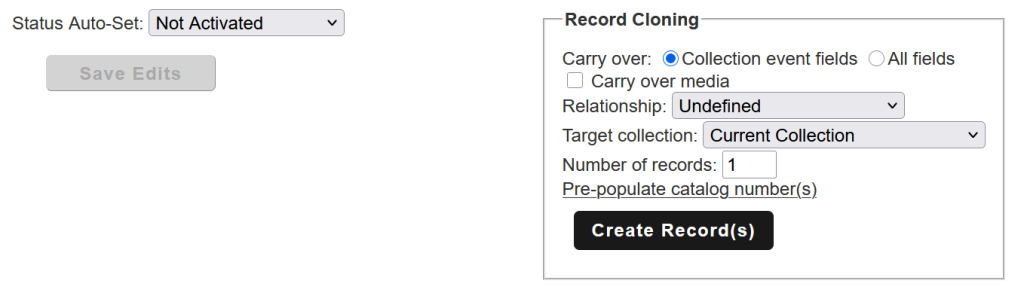
When saving edits to a particular record, it is possible in Symbiota to clone a record. This can be particularly useful, when specimens cannot be physically separated.
Cloning a record with the target collection set to ‘current collection’ is useful for example, when different species grow on the same substrate and the attempt to separate the two would risk destroying the specimen.
It is also a common scenario where one record refers to the a lichen, the other to a lichenicolous fungus growing on that lichen. In that case the relationship can be defined for the record host lichen (hostOf …) or the lichenicolous fungus (hasHost …).
Using the option to choose a different ‘target collection’, cloning records can also be an efficient way to create duplicate records that will automatically be added to a different collection, when specimen duplicates are donated to that collection as a gift.
In all cases, cloning records, you have the choice to carry over only the fields from a ‘collection event’ (collector, date, locality), but not the identification, or ‘all fields’:
_______________________________________________________________________________________
